Profile Settings

Last Article Update 19.03.2026

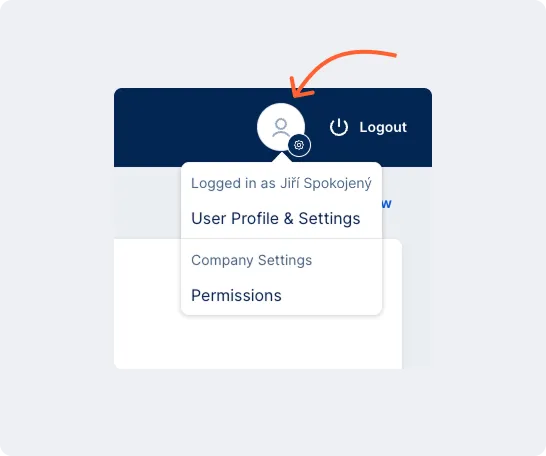
George Business user profile entry point George Business user profile entry point

You can find personal and company profile settings in the George Business header, next to the logout button. Here, you’ll find key information: your personal settings and contact details. If you have an administrator role, you can also manage user permissions and limits.

The profile settings menu includes:

  • User Profile & Settings
  • Company Settings – Permissions

User Profile & Settings

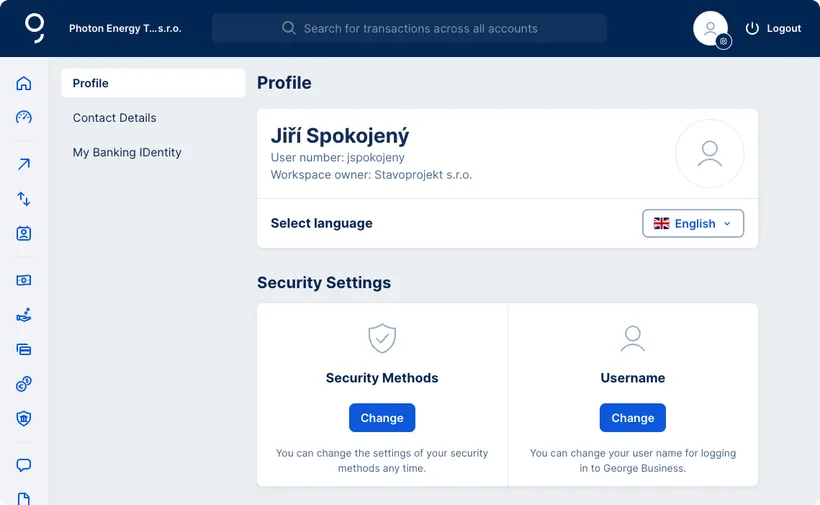
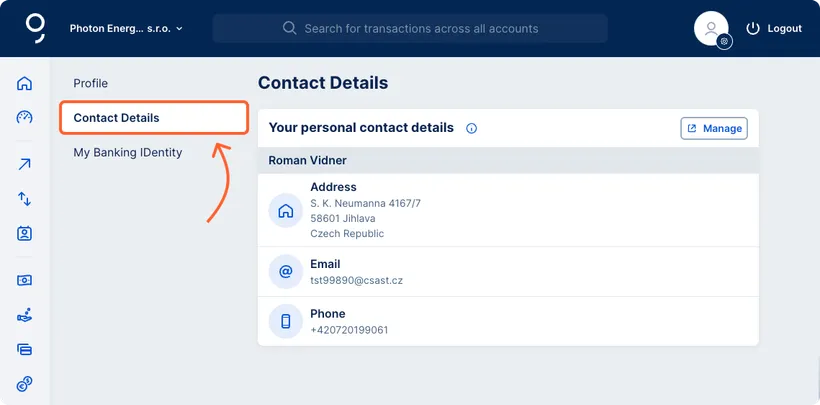
When you open User Profile & Settings, you'll see three options in the menu on the left:

Security Settings

At the bottom of your Profile card, you will find two tiles that provide access to the IDentity Management application: Security Methods and Username. IDentity Management is shared across both personal and business George accounts. Any changes you make here will apply to both, except payment limit settings, which only affect personal accounts.

Security Methods

Here, you can view a list of devices where you've activated George’s authentication method for logging into Česká spořitelna applications and confirming transactions. You can remove any device you no longer use or block the authentication method completely.

Username

If you want to change your current username, you can do it here anytime. 

Your username must meet the following criteria:

  • It must be unique within Banking IDentity.
  • It must be between 6 and 40 characters long.
  • Allowed special characters are dot (.), underscore (_), and hyphen (-).
  • It can consist only letters, only numbers, or a combination of both, including the allowed special characters.
  • It can also be in email format – in this case, the @ symbol is allowed.
  • It cannot contain diacritics or spaces.
  • It is not case-sensitive.

Company Settings – Permissions