Transaction History

Last Article Update 13.03.2026

Every financial product that has incoming and/or outgoing transactions, i.e. current and savings accounts, credit cards, loans and other financial products, has a transaction history. The history contains all completed transactions related to the specific product.

By default, each transaction history includes transactions that were made up to 7 years in the past.


Account history Account history

How to access transaction history

When you open the detail of a particular account, card or other product with transactions, the history will open by default.

The only exception is loans. When you open the detail of a loan, the overview with product details will initially open.

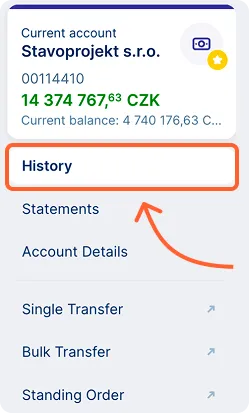
Whenever you navigate to the detail of a particular product, you can always switch to the history using the product's left side menu.

Left account menu with history option Left account menu with history option

What is available in the history?

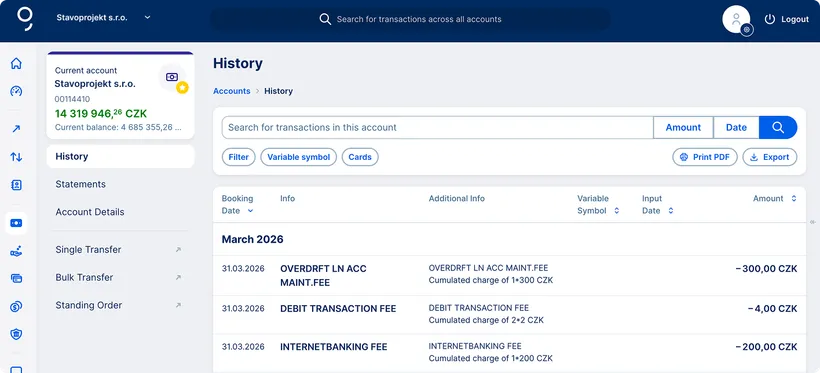
The History overview displays the main transaction details, including the booking date, recipient name and account number, variable symbol, and amount.

The Additional info column shows information such as the payer’s or recipient’s message, or the specific and constant symbols where applicable.

George displays the transactions in a chronological order, beginning with the most recent transaction.

If you want to narrow down the selection of displayed transactions, you have a range of filters at your disposal. You can search by

  • Incoming/outgoing transactions  click the "Filter" button and select the transaction type
  • Variable symbol
  • Amount
  • Date (from–to)

In order to access the transaction details, simply click on the relevant transaction row.

You can also print or export your history from here by clicking the respective buttons in the top right corner.
 

Opening and closing balances

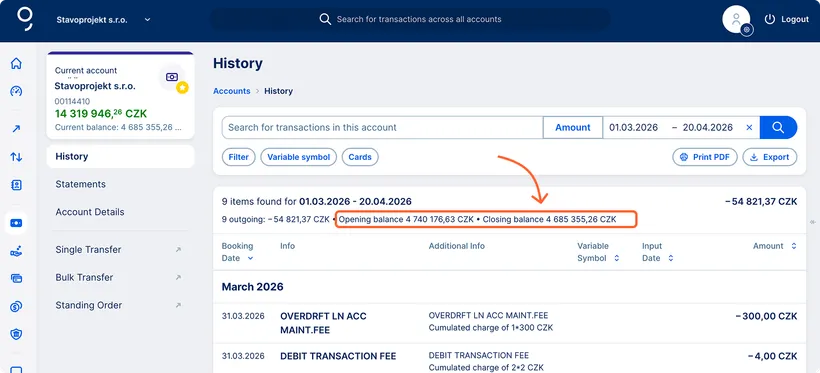
If you use the date filter (from–to) in the transaction history of your accounts, you will see the opening and closing balances for the selected transactions. 

You can print the opening and closing balance along with the transaction history in PDF format or export it to MS Excel.

Opening and closing balances Opening and closing balances