Your Account Details

Last Article Update 17.12.2025

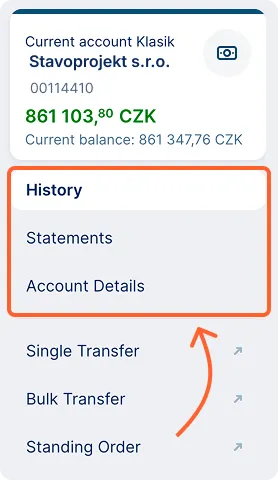
You can access the information and functions related to a specific account either from the main overview in the “Accounts” section or from the account overview (via the “Accounts” item in the main left menu). By clicking on any account, you will open the account details. In the top left corner, a card with basic information will appear, showing you which account the information relates to.
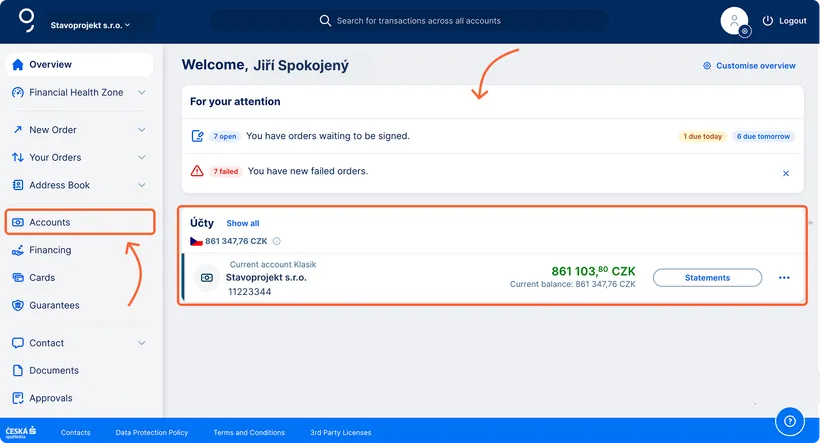
 

Your account details Your account details
Account Detail Account Detail

Below the information card, you will find a menu with the following items:

  • History
  • Statements
  • Account Details

History

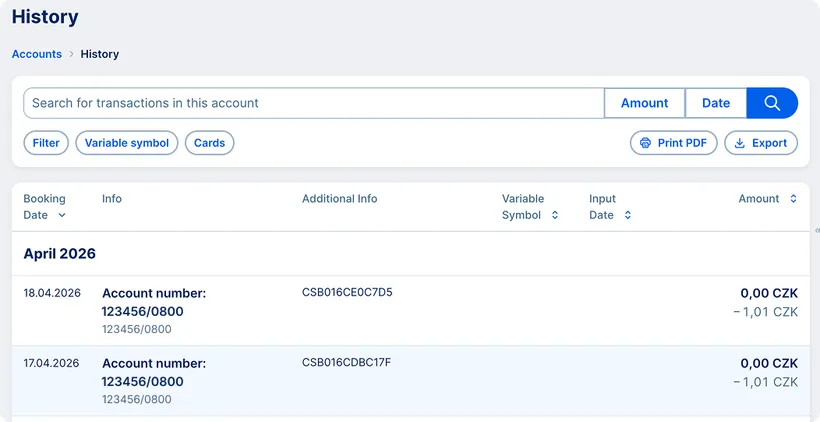
History History

In the History section, you can view all account transactions. At the top of the screen, there is a filter for easier searching. Using the “Filter” button, you can display only incoming or only outgoing payments, search by variable symbol, or filter payments made with a specific card. You can download the history in the selected file format or print it using the buttons in the top right corner (print and download icons).

Statements

You can easily switch to account statements from the left menu. Here, you can download statements – either individually or in bulk – and then print them.

Account Details and Additional Features

In the left menu, you can switch to another screen – Account Details – where you’ll find all account details, such as the name, current balance, available funds, IBAN, and more.

At the bottom of the screen, you’ll find online requests related to the specific account or the entire company: a request for account or balance confirmation, a high-limit withdrawal, or a bank report for the auditor.

We describe everything in more detail in the Account Information chapter.