Account Statements

Last Article Update 29.04.2025

To have a complete overview of your finances, you can download transaction statements for any of your accounts in George Business.

Statements contain all essential details, such as the account name and number, statement number, opening and closing balances, total incoming and outgoing payments, and, of course, a summary of account transactions.

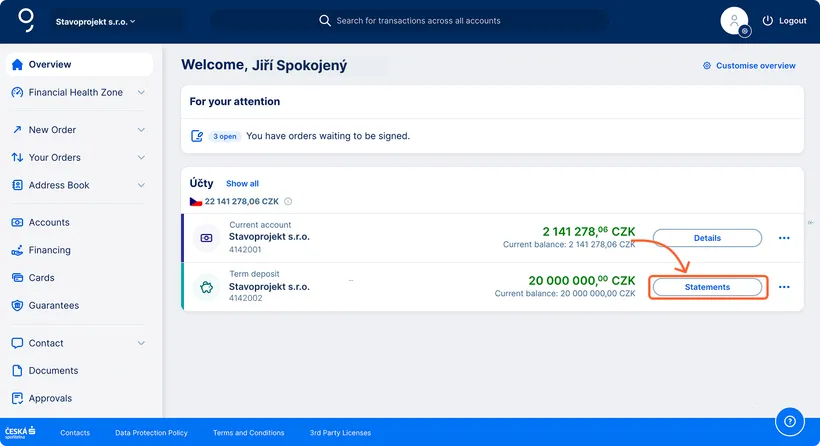
You can easily access the statements page directly from the George Business Overview by clicking the appropriate button next to the selected account (see the "Accounts" section).
Electronic Statements

Electronic statements are available in the following delivery frequencies:

  • daily
  • weekly
  • monthly
  • quarterly
  • annually

Data Statements

You can configure the frequency of data statements in George Business.

The available frequencies for data statements may vary depending on the account type:

  • Daily (always available)
  • Weekly (only for some account types)
  • Monthly (only for some account types)

Downloading Statements

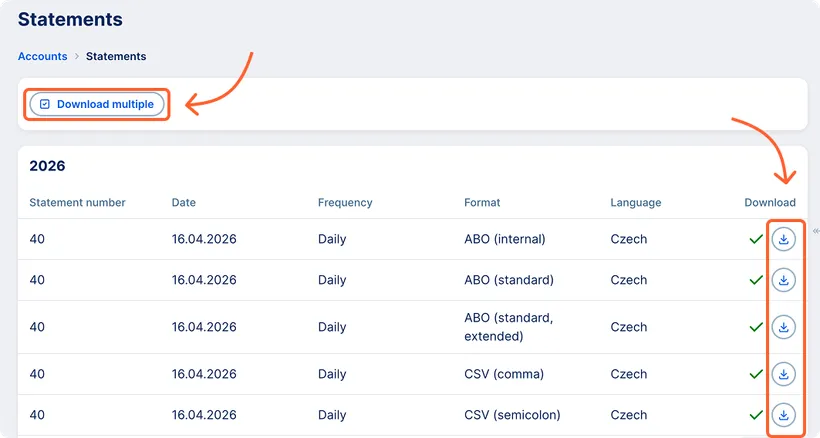
Using the "Download Multiple" button, you can download multiple statements at once (currently only from a single account).

If statements can be merged (see "Merging Data Statements"), the user receives a single file; otherwise, they will receive a zip archive.

Once downloaded, the data statement is marked in green. The download information is visible to all users of the workspace with the appropriate permissions.

Once an electronic statement is downloaded, it is also marked in green. However, the download information is visible only to the user who downloaded it.

Merging Data Statements

  • Data statements in the same format are automatically merged into one file during multiple download.
  • When merged, statements are sorted from the most recent.
  • The resulting file is named: Export_multi_<date>_<time>.<suffix>.
  • Supported formats: ABO, CSV, XML, MT940
  • Unsupported formats: SEPA XML and PDF


Permissions for Downloading Statements

Downloading statements is only available to users with the View balance and transaction history permission for the respective product. This permission is assigned by the workspace administrator.

Electronic Statement Signing

Electronic statements in PDF format are electronically signed by the bank.

Statements After Transition from BUSINESS 24

In George Business, you will have access to data statements in the format you used the most frequently in BUSINESS 24 over the past month. Electronic statements will remain unchanged.

The current statement settings and the option to modify them can be found in the left menu under "Export" and "Statement Settings." More details can be found in the chapter "Account Statement Settings."