Account Statements provide a comprehensive overview of your finances. They contain all essential details, including the account name and number, statement number, opening and closing balances, total incoming and outgoing payments, and a summary of account transactions. You can easily customize the content, format, language, and frequency of the statement delivery in George Business.
Account Statements Setting
Last Article Update 19.12.2025
Statement Settings
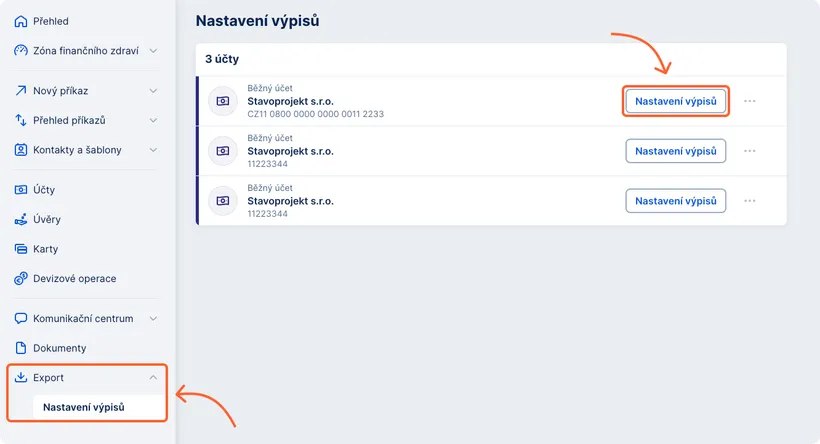
Current statement settings and management options can be found in the left menu under "Export" and by selecting "Statement Settings."
A list of accounts included in the workspace and eligible for statement settings modifications will be displayed:
- Current accounts
- Foreign currency accounts
- Savings accounts
- Deposit accounts
- Other applicable accounts
Modifications can be made online only if the statement series is delivered to George Business.
Creating a New Statement
To add a new statement series, use the "New statement rule" button located in the top right corner of the screen. When defining a new statement series, you need to select the desired file format, statement frequency, and language.
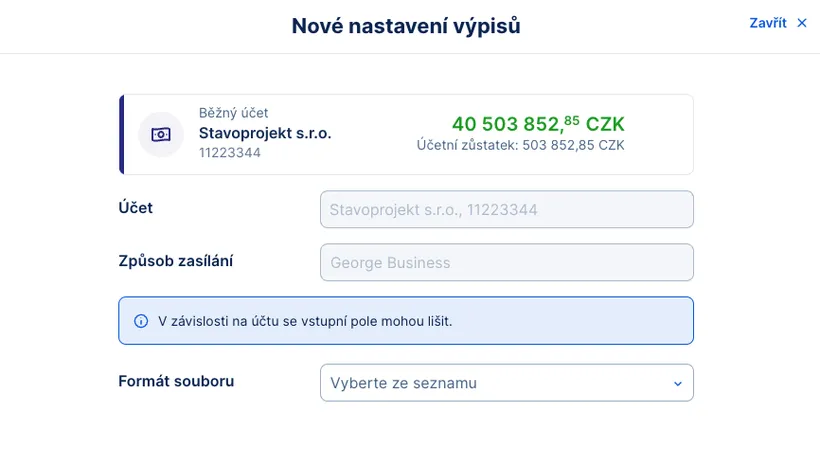
Editing a Statement Series
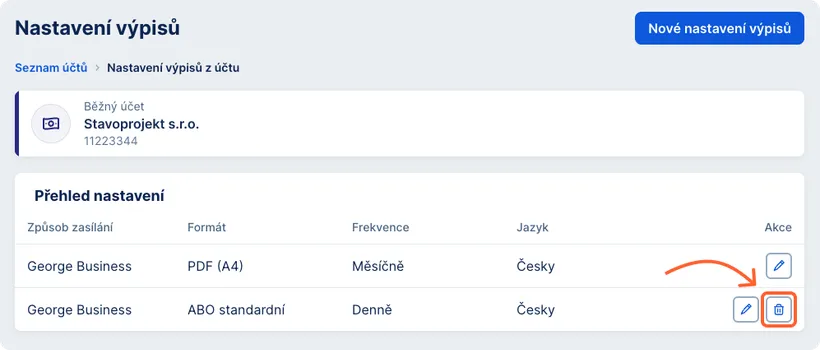
You can modify a statement series by clicking the pencil icon at the end of the corresponding row. The parameters available for modification include:
- Frequency
- Language
The available options for each parameter may vary depending on the type of product.
Deleting a Statement Series
An existing statement series can be deleted by clicking the trash bin icon on the right side of the respective row.
Permissions for Statement Settings
Viewing and modifying statement settings are only available to users with an administrator role authorized to manage the given workspace.
Statements after Transition from BUSINESS 24
In George Business, you will have access to data statements in the format you most frequently used in BUSINESS 24 over the past month. Electronic statements will remain unchanged.