Ensure a stable balance on your account. By setting up a balance regulation standing order, your account balance will automatically be adjusted to the required limit.
Create a Sweep Order
Last Article Update 30.01.2026
Types of Balance Regulation
Fixed Regulation Type
When creating a balance regulation standing order, you can choose a fixed regulation type. This type ensures that the selected account always maintains the balance you specify.
How it works:
- Funds exceeding the set balance are automatically transferred to another of your accounts.
- Any missing amount up to the set balance is automatically topped up from another of your accounts.
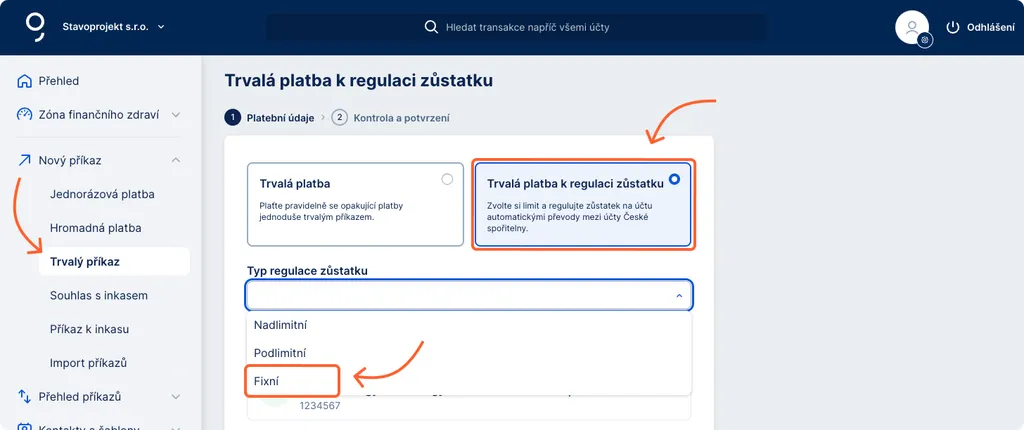
How to Create a Balance Regulation Standing Order
-
In the George Business web banking menu, click “New order”.
-
From the dropdown menu, select “Standing order”. A form for entering payment details will open.
-
At the top of the form, choose “Standing order for balance regulation”.
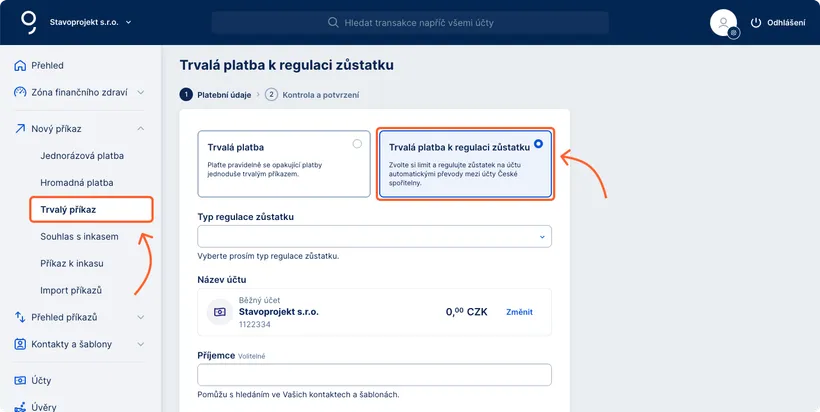
Then fill in the following:
Type of regulation – over-limit or under-limit.
Account name where you are setting the balance limit (you may edit it if needed).
Recipient – select from your saved contacts or enter the Česká spořitelna account number manually.
Required balance – enter the amount in CZK (other currencies are not available). You may also set the balance to 0 CZK.
Optional fields: variable symbol, constant symbol, specific symbol, message to recipient, message to payer.
Next payment date – the date from which the balance regulation standing order becomes active.
After completing the form, you can save the order, save and create another one, or confirm it immediately.
How to Edit a Balance Regulation Standing Order
1. In the left menu, open “Order overview” and select “Standing orders”.
2. In the list, find your balance regulation orders – they are labelled in the “Status/Type” column. You can also filter them by type.
3. Click the selected order to open its detail.
4. You may confirm the order directly or save it and confirm later.
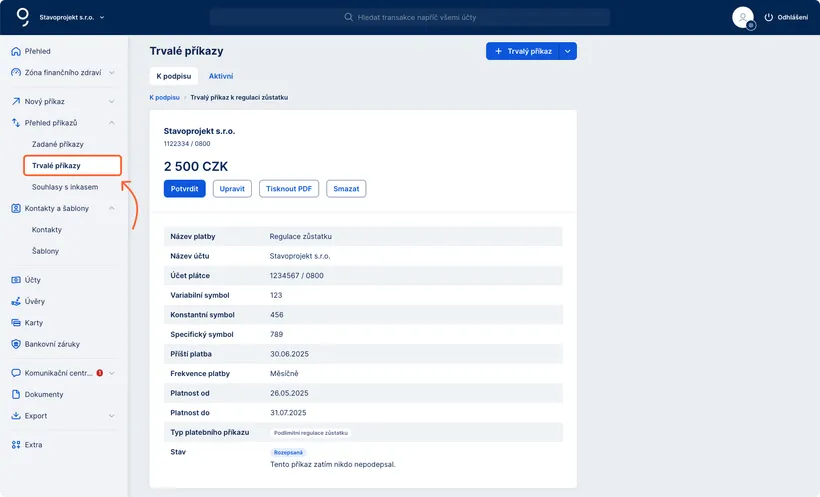
How to Delete a Balance Regulation Standing Order
The process is the same as for deleting or cancelling any standing order.
-
In the left menu, open “Order overview” and select “Standing orders”.
-
Choose the appropriate folder:
- To be signed – orders waiting for confirmation,
- Active – already active orders.
-
Locate the balance regulation order (labelled in “Status/Type”). You can filter by type if needed.
-
If the order is waiting for confirmation:
Delete it via the three-dot menu (Delete), or open its detail and click Delete.

-
If the order is already active:
Cancel it via the three-dot menu (Cancel) or click Cancel in the order detail.
-
In the confirmation window that appears, complete the deletion/cancellation by clicking Continue.