If you want to use Direct Debit for recurring payments, you must give the bank approval to transfer the required amount from your account to the recipient’s account. You can set up this approval in George Business in a similar way as a Direct Debit order or a standing order.
Direct Debit Approval
Last Article Update 30.01.2026
Setting up a domestic Direct Debit approval
-
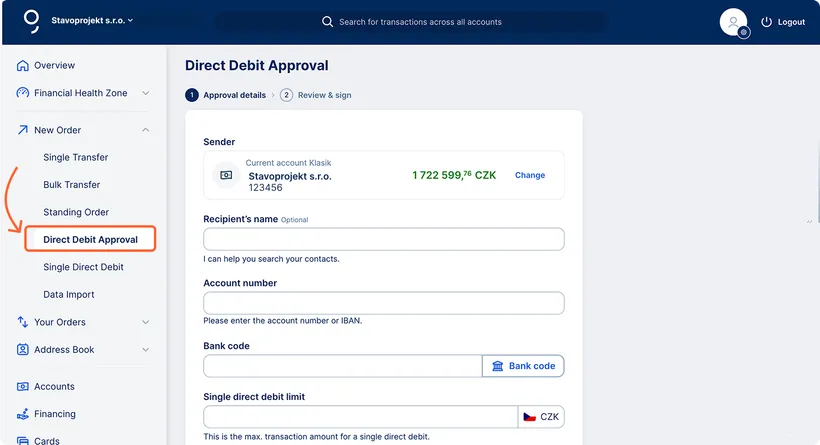
Click New order.
From the dropdown list, select Direct Debit approval. A form for entering details will appear.
-
Select the sender’s account
The sender’s account field is automatically pre-filled with your primary account. You can change it by clicking Change. If multiple accounts are available in your workspace, you’ll see a list from which you can select the appropriate one.
-
Recipient’s name (optional)
Entering the recipient’s name is optional. If you click the Recipient name field, you can select the recipient from your saved contacts. The recipient’s account number will then be filled in automatically.
-
Account number
If you don’t use the saved contacts option, enter the full account number and bank code manually (you can select the code from the list of banks).
-
Optional fields
You can optionally fill in the following details:
- Approval name – to distinguish between multiple approvals
- Variable symbol
- Constant symbol
- Specific symbol
-
Single direct debit limit
Enter the maximum amount in CZK that can be withdrawn for a single Direct Debit payment.
-
Monthly direct debit limit
Optionally, you can enter the maximum total amount that may be withdrawn via Direct Debit in one calendar month.
-
Approval validity period
Click the Valid from field to open a calendar and select the start date. If no date is entered, the approval will be valid from the earliest possible date.
Filling in the Valid until field is optional — the mandate will remain valid either until the entered date or until you cancel it.
-
Saving the Direct Debit approval
If you don’t want to confirm the approval immediately, you can save it. It will then appear in the Direct Debit approval section under the Signature folder
-
Confirming the approval
To proceed directly to authorisation, click Sign. A Review and confirmation screen will appear where you can double-check all details. Then confirm the approval using the George Business mobile app.
Viewing Direct Debit approvals
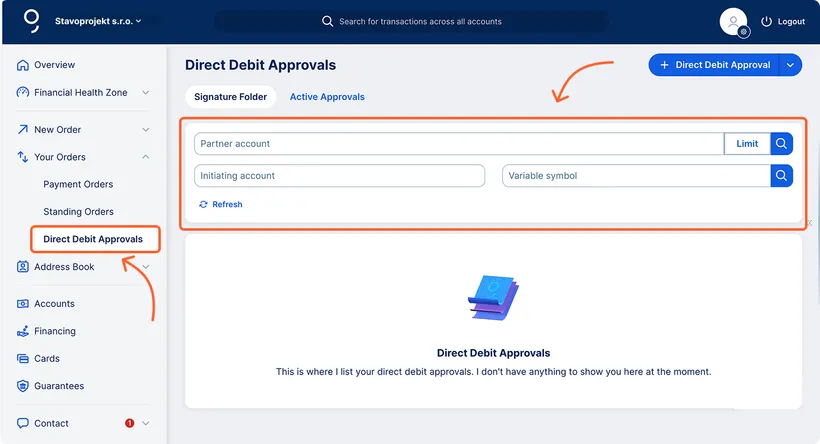
To access the list of domestic Direct Debit approvals, open Your Orders from the left-hand menu and click Direct Debit Approvals. You’ll see a list of all approvals that are pending signature.
From this screen, you can also create a new approval by clicking + Direct Debit Approval in the top right corner.
Filtering Direct Debit approvals
You can filter Direct Debit approvals by:
- Partner account – enter the account number without the bank code.
- Initiating account – select from the available accounts.
- Variable symbol – enter if it was included in the approval.
- Limit – specify an amount range for a single Direct Debit payment.
Editing a domestic Direct Debit approval
Only active Direct Debit approvals from a current account can be edited.
In the list of active approvals, select the one you wish to change and click Edit. In the form that appears on the right side of the screen, make the necessary changes and confirm them.
Deleting a domestic Direct Debit approval
To revoke your approval for direct debit, please proceed as follows:
Permissions for Direct Debit approvals
- To create a new Direct Debit approval, a user must have permission to Submit payment orders for the relevant account.
- To confirm a Direct Debit approval, a user must have permission to Sign payment orders for that account.
- To view the list of Direct Debit approvals without the ability to modify or confirm them, a user must have permission to View balances and transaction history for the relevant account.