In the event of loss, theft, or misuse of a payment card, it is necessary to lock the card as soon as possible. Ideally, you should use temporary locking, which can be done in your George Business banking with just a few clicks. If you find the card, you can easily unlock it and continue using it.
Card locking and unlocking
Last Article Update 17.12.2025
Temporary card locking
You can lock the card directly in the web or mobile George Business app, or you can call us.
Authorization for temporary locking of the card:
- The cardholder can temporarily lock only their own card.
- An authorised user who has been appointed as the card administrator can lock all cards issued to accounts within the given workspace.
The payment card will remain locked until it is unlocked or until its validity expires.
How to lock a payment card?
Web app
- Find the card you want to lock in the card overview.
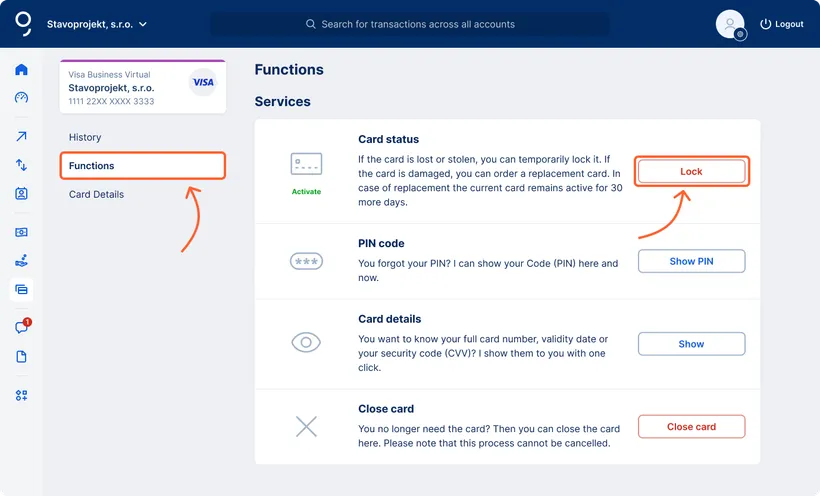
- In the card detail, go to “Functions” in the left menu.
- If the card is active, click the “Lock” button in the “Card status” section under “Services”. For inactive cards, the locking function is not available and the card must be activated first.
- Then a “Temporary card lock” window will open. Check all the details and confirm the locking.
Card unlocking
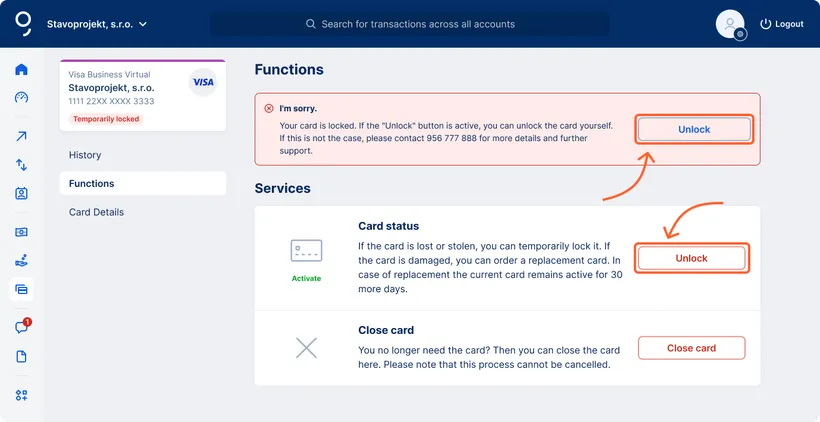
If the card is locked, its status will appear as “Temporarily locked” in the card overview.
Authorization for unlocking the card:
- The cardholder can unlock the card only if they have locked it themselves.
- If the card has been locked by the card administrator, only the card administrator can unlock it.
How to unlock a payment card?
Web app
- In the card overview, select the temporarily locked card and click on the “Card details” button.
- Then go to “Functions” in the left menu.
- In the red warning box, click “Unlock” or click the “Unlock” button in the “Card status” section under “Services”.
- Then authorize the request via the mobile application.
Card closing
If you wish to cancel the card entirely, the card administrator can close the selected card in the following way:
-
In the Cards section, select the specific card you want to close.
-
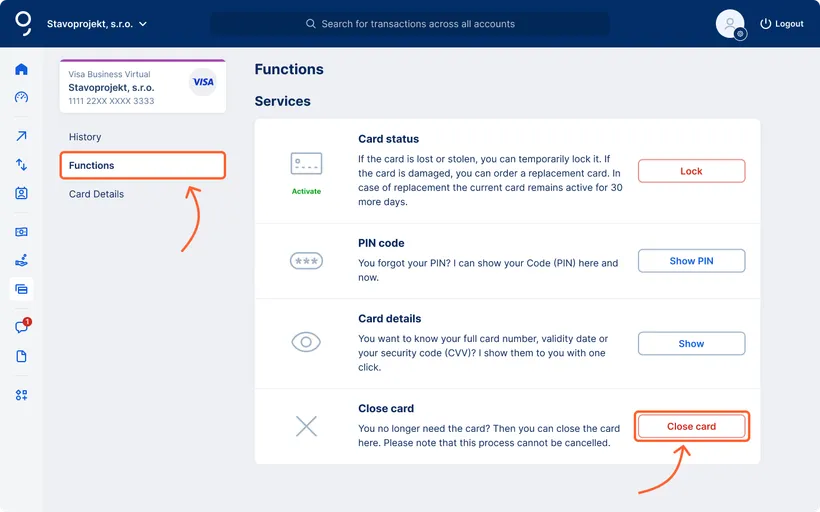
Click on "Functions" in the left part of the screen.
-
At the bottom of the screen, in the “Services” section, click the "Close card" button.