In George Business, you can conveniently open a deposit account online and manage selected parameters for deposit accounts with automatic renewal. Everything can be handled directly in the desktop application – without visiting a branch and with full control over the entire process, from account opening to ongoing deposit management.
Deposit Account
Last Article Update 29.01.2026
Opening a deposit account
You can open a deposit account in George Business in three currencies: CZK, EUR or USD. There are two ways of opening the account:
- In the Accounts section, click the "Create a deposit account" button in the top right corner. In the form that opens then select a current account.
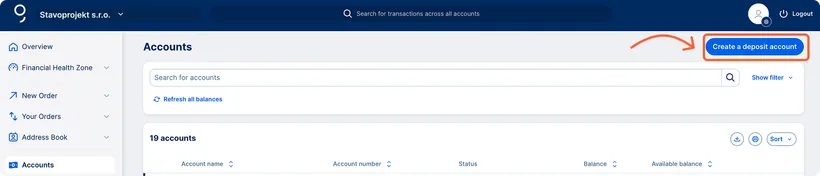
- In the Accounts section or in the main overview select a specific current account from the list and click the three dots. From the menu select "Create a deposit account". A form opens with the current account prefilled.

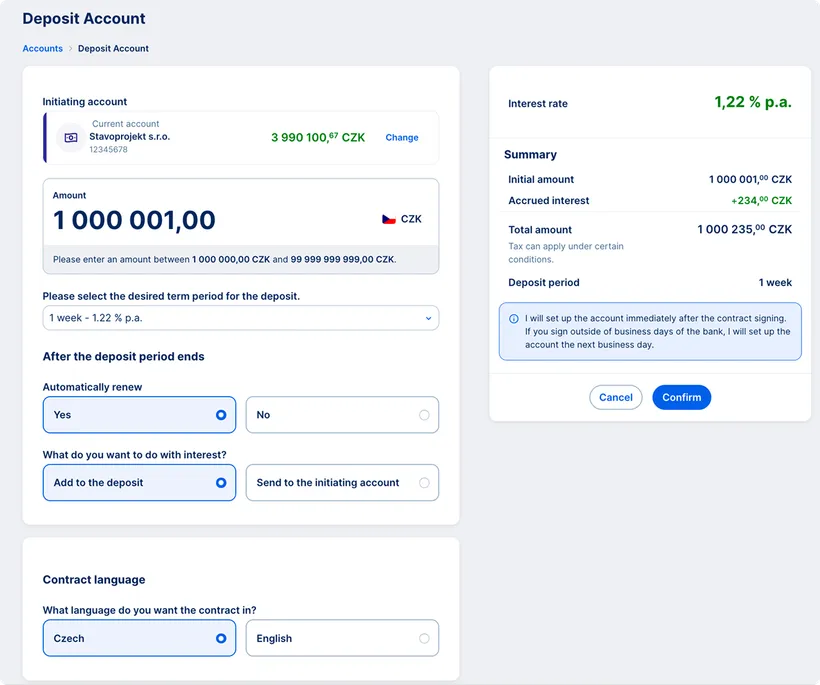
Fill in information in the form:
1. Select the current account from which the deposit will be funded. If it has been prefilled, you can check that it is the right account and change it if necessary.
2. Enter the amount. The minimum deposit amount is CZK 1,000,000, EUR 40,000 or USD 40,000.
3. Choose the deposit term period. The available options are: 1 week, 2 weeks, 1 month, 3 months, 6 months and 1 year. An individual interest rate is displayed for each term period.
4. Specify whether the deposit should be automatically renewed. If yes, select the account to which the interest should be credited.
5. Choose the language of the contractual documentation.
Contract signing and documents
The request can be submitted at any time. We open the account on business days immediately after the contract is signed. If the contract is signed on a weekend or public holiday, the account will be opened on the next business day.
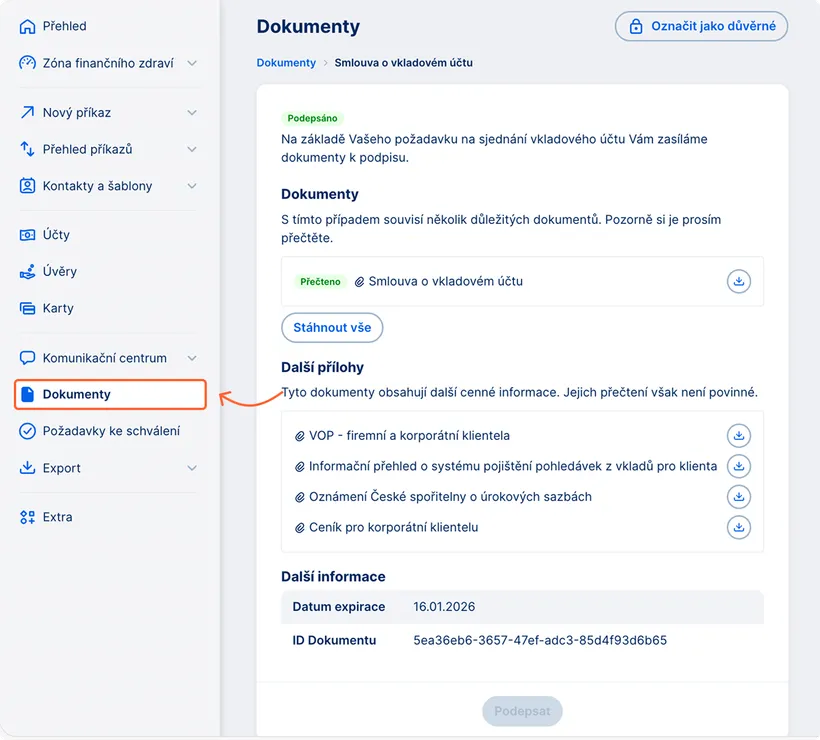
After submitting the request, the contract will be available in the Documents section to be signed by the authorized person.
The contract must be signed within 3 hours after it becomes available.
When a deposit account cannot be opened
A deposit account cannot be opened if:
- the contractual documentation is not signed within three hours after it becomes available in the Documents section
- there are insufficient funds in the selected current account at the time of opening.
In these cases, you need to submit a new request for opening a deposit account.
Managing a revolving term deposit account
You can manage a deposit account with automatic renewal (revolving) directly in the George Business web application from the detail of a specific account.
Changes can be made only on the maturity date of the deposit. On that day, you can adjust the principal amount (increase or decrease the deposit) or change the deposit term period. If you attempt to make changes outside the maturity date, George will notify you accordingly.
Required permissions
Changes can be made by a user with permissions for the linked current account (View balances and transaction history and Approve payments independently).
To view the Deposit account confirmation in the Documents section, the permission Obtain information on daily banking products is required.
How to change a deposit account
1. Open the detail of a deposit account and switch to Account Details. Scroll down to the Service Operations section where you will find Change of deposit account. Click the "Change" button.

2. Adjust the principal amount (increase or decrease the deposit) or change the deposit term period.
Confirmation of deposit changes
After submitting the changes, a confirmation of the deposit account will be delivered to the Documents section. On the following business day, you will also receive the Term deposit confirmation.
Summary
In George Business, you can open a deposit account online and manage revolving deposit parameters. The process follows clear steps and provides access to the status of your submitted request and contractual documentation.