Check the balances across all companies you are authorized to access and download account statements. Everything is conveniently available in one place.
Balances and Statements of All Companies
Last Article Update 12.05.2026
How to display balances and statements
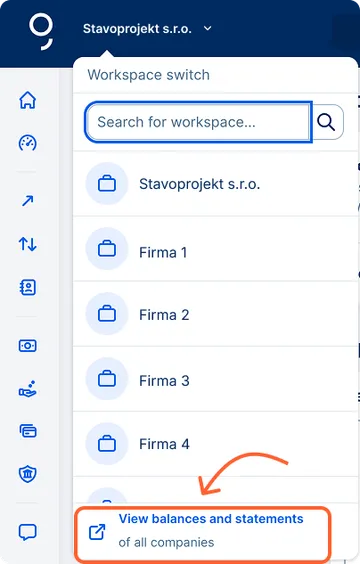
If you have access to accounts of more than one company, you will see a workspace (company) switcher on the left side of the blue bar.
1. Open the workspace switch.
2. Click the "View balances and statements" link at the bottom.
3. A complete overview of balances and statements for all companies will open.
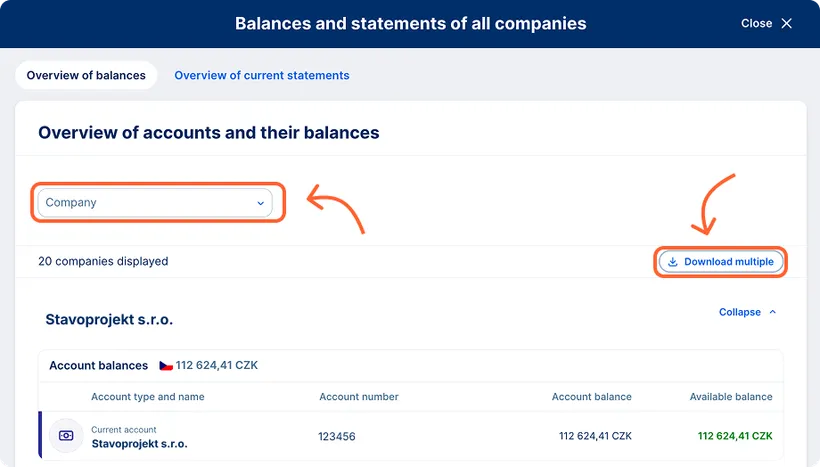
Overview of balances
The overview displays the accounting and available balances of all accounts you are authorized to access. This includes current, foreign‑currency, savings, and deposit accounts. You can use filtering by company, and when downloading in bulk, you can easily choose whether you want to download the overview for all companies or only selected ones.
You can download the entire overview in PDF or CSV format. The download and print button is located at the top of the screen.
Overview of current statements
When you switch to the "Overview of current statements" tab, you will see all available statements for every account you have the required permissions for.
The functionality is the same as in the "Export" and "Current statements" sections for a specific company. The advantage here is that you can access statements across all companies conveniently in one place.
You can filter statements by period, frequency, format, account, or company. A bulk download option is also available, allowing you to obtain all necessary documents with a single click.